Threats
Threats describe ways in which the security of a product or system could be compromised.
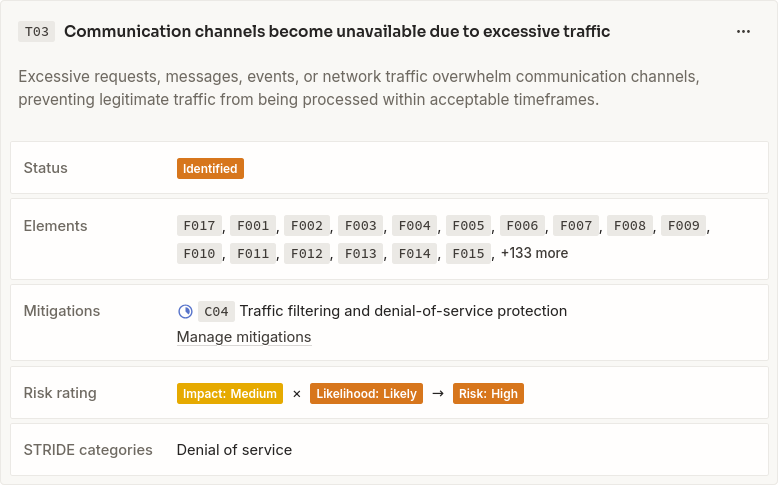 An example threat in Lantern
Threats belong to the project and can be linked to the specific elements they affect. These relationships connect each threat to the relevant parts of the system, associated assets, and any planned or implemented mitigations.
Identifying threats
Threats should describe a concrete security concern within the context of the modeled system.
A useful threat description explains:
- What could happen
- How the threat could occur
- Which assets or security properties may be affected
- What the consequences could be
Threats can be identified while reviewing an overview diagram or while analyzing a detailed feature diagram.
Because threats are linked to project elements rather than diagram shapes, a threat remains associated with an element wherever that element appears.
Threat suggestions
Lantern can suggest threats based on the type and traits of an element.
Suggestions are provided by active threat sources (for example Latern Core, Lantern Web, or Lantern OT). Each source can define rules that determine when one of its threats is relevant.
Matching primarily uses:
- The element type
- The traits assigned to the element
For example, a SQL injection threat may be suggested for a process with both
the sql and user-input traits.
A suggestion means that a threat is worth considering. It does not mean that the system is vulnerable. The modeler decides whether to add the suggested threat to the project.
Threat sources can also introduce additional traits needed by their matching rules, allowing threat suggestions to be extended for specific technologies or environments.
Linking threats to elements
A threat can be linked to the project elements it affects.
Threats can apply to:
- Processes
- Entities
- Stores
- Flows
- Boundaries
Linking threats to elements makes it possible to:
- Find all threats affecting a particular component
- Identify threats associated with critical assets
- Review threats across multiple diagrams
- Track mitigations back to the affected parts of the system
- Include element context in reports
A threat may be relevant to more than one element when the concern spans several parts of the system.
STRIDE categories
Threats can be categorized using STRIDE to provide a consistent way to classify threats and track coverage.
Likelihood
Likelihood describes how probable it is that a threat will occur.
Lantern uses the following likelihood values:
- Theoretical
- Unlikely
- Plausible
- Likely
- Expected
Likelihood should be assessed in the context of the modeled system, including its exposure, deployment environment, existing controls, and expected attackers.
Impact
Impact describes the severity of the consequences if a threat occurs.
Lantern uses the following impact values:
- Negligible
- Low
- Medium
- High
- Critical
Impact can consider consequences such as:
- Exposure or modification of sensitive assets
- Loss of availability
- Unauthorized access
- Financial loss
- Regulatory or contractual consequences
- Reputational damage
- Disruption of business goals
Risk
Lantern calculates threat risk from its likelihood and impact.
Risk helps teams compare threats and prioritize further analysis or mitigation. The calculated risk should be considered alongside the threat description, affected elements, related assets, and business context.
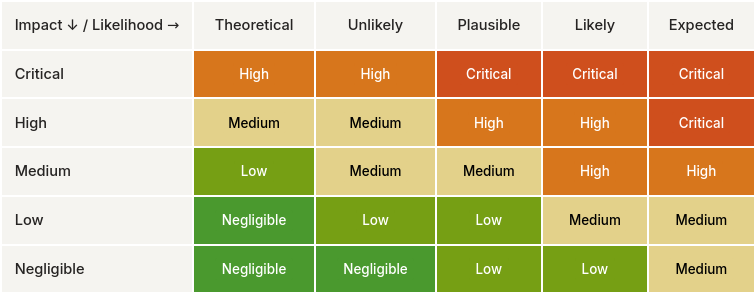 Risk matrix used to calculate risk level
Risk is not a substitute for judgment. Two threats with the same calculated risk may require different responses because they affect different assets or business goals.
Threat status
Each threat has a status that describes its current state.
Lantern uses the following threat status values:
- Identified
- In progress
- Mitigated
- Accepted
- Not applicable
Identified
The threat has been recorded but work to address it has not yet started.
In progress
The threat is currently being investigated or addressed.
Mitigated
The threat has been addressed by one or more implemented mitigations.
A threat marked as mitigated remains part of the project so that the original concern and its treatment can be reviewed and reported.
Accepted
The threat is understood, but the remaining risk has been accepted.
Risk acceptance should be an explicit decision based on the threat's likelihood, impact, business context, and available mitigation options.
Not applicable
The threat does not apply to the current design or context.
The threat remains recorded to preserve the analysis and explain why no mitigation is required.
Threats and diagrams
Threats belong to the project and are included in project-wide analysis and reporting.
When a threat is identified in a diagram, it is also linked to that diagram. This makes it possible to view only the threats that are relevant to the elements and interactions shown in a particular diagram.
A threat linked to a diagram still remains part of the project-level threat model. It does not need to be recreated when the affected element appears in another diagram.
This supports both:
- Diagram-level review of threats visible in a specific view
- Project-level review of all threats across the complete security model
Threats and mitigations
Mitigations can be mapped to threats. A threat can have multiple mitigations, and a mitigation may contribute to addressing more than one threat.
The relationship between threats and mitigations makes it possible to determine:
- Which threats have planned mitigations
- Which mitigations are being implemented
- Which threats remain unaddressed
- Which threats have been accepted
- Which implemented controls address a particular concern
A threat should not be considered mitigated solely because a mitigation has been proposed. The status of the associated mitigations must reflect whether the required controls have actually been implemented.