Assets
Assets represent information or resources that need to be protected. A project can contain multiple assets and each asset can be linked to the elements that store, process, send, receive, or otherwise handle it.
This allows you to record all identified assets in a single place and makes it possible to trace where an asset lives and how it travels through the system.
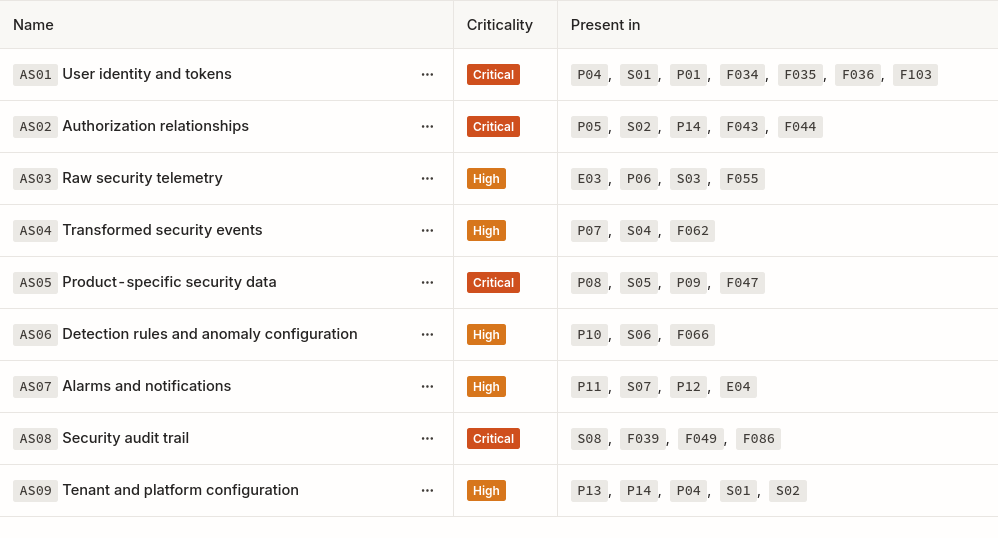 Asset list in a project
Asset catalog
The asset catalog provides a project-wide inventory of important assets. Assets are defined once at the project level and can be linked to multiple elements across multiple diagrams.
Examples of assets include:
- PII
- Authentication credentials
- Payment information
- Encryption keys
- Source code
- Configuration
- Audit logs
- Business records
- Administrative capabilities
- Service availability
An asset should represent something with security value you want to protect within the scope of the project.
Criticality
Each asset has a criticality value (Low, Medium, High, or Critical).
Criticality describes how important the asset is to the project and the business. It can be used to prioritize analysis, identify sensitive parts of the system, and provide context when evaluating threats.
Linking assets to elements
Assets can be linked to project elements.
An asset can be linked to:
- A process that handles or transforms it
- A store that retains it
- An entity that provides or receives it
- A flow that carries it
These relationships describe how the asset is used throughout the system, and because elements belong to the project, asset relationships remain consistent across every diagram that reuses those elements.
Tracing assets
Linking assets to elements allows Lantern to show where an asset is stored, processed, and transferred.
For example, a customer record may be:
- Sent by a customer through a flow.
- Processed by an application.
- Sent to a backend service.
- Stored in a database.
- Included in an audit event.
Each step can reference the same project asset. This creates a connected view of the asset across the complete security model rather than limiting analysis to a single diagram.
Assets and flows
Linking an asset to a flow indicates that the asset travels through that flow.
The direction of the flow determines the direction in which the asset moves.
Assets and stores
Linking an asset to a store indicates that the asset is retained there.
A single asset can be stored in multiple locations. For example, account data may exist in a primary database, a cache, a backup, and browser storage.
Modeling each relationship helps identify all locations where the asset needs to be protected.
Assets and processes
Linking an asset to a process indicates that the process handles, reads, creates, modifies, or otherwise uses the asset.
The relationship does not by itself describe exactly how the process uses the asset. That context can be provided by the process description, metadata, and its connected flows.
Assets and entities
Linking an asset to an entity indicates that the entity provides, receives, owns, or otherwise interacts with the asset.
For example:
- A customer provides personal data.
- An administrator receives audit information.
- An external payment provider receives transaction details.
Assets and threats
Assets provide context for understanding the consequences of a threat.
A threat is linked to the element it affects. Asset relationships show which assets may also be exposed when that element is compromised.
This allows analysis and reporting to connect:
- The affected element
- The related assets
- The identified threat
- The threat's likelihood and impact
- The associated mitigations
Assets do not replace element-level threat analysis. They provide additional context about what must be protected and why it matters.